

Here’s how to cut a SIM card down to nano size safely, when it actually still makes sense, and why most people in 2026 don’t need to cut a SIM at all anymore. New to the digital side of this? Here’s what an eSIM card actually is.
You probably don’t need to cut a SIM anymore

Prefer to have all this explained as a video instead? Check out this one from Techquickie on how SIM cards actually work:
Let’s start with the thing nobody told you. The reason people used to cut SIM cards was a mess of competing sizes. Your old phone took a mini SIM, your new one wanted a micro, the one after that wanted a nano, and carriers shipped whatever they felt like. So you grabbed a craft knife and prayed.
That era is mostly over. Since around 2014, basically every new phone uses the nano SIM, the smallest standard size. The industry settled on it. Buy a phone today and the tray is cut for nano, full stop. So if you’re moving a number between two reasonably modern phones, there’s nothing to trim. The card already fits.
And on a lot of recent phones, there’s no tray to fit anything into. Apple dropped the physical SIM slot on US iPhones starting with the iPhone 14, and several flagship Android phones are heading the same way. Those phones use an eSIM, a chip built into the phone that you program over the air. No card, no cutting, no tray. We’ll come back to that.
SIM card sizes, explained
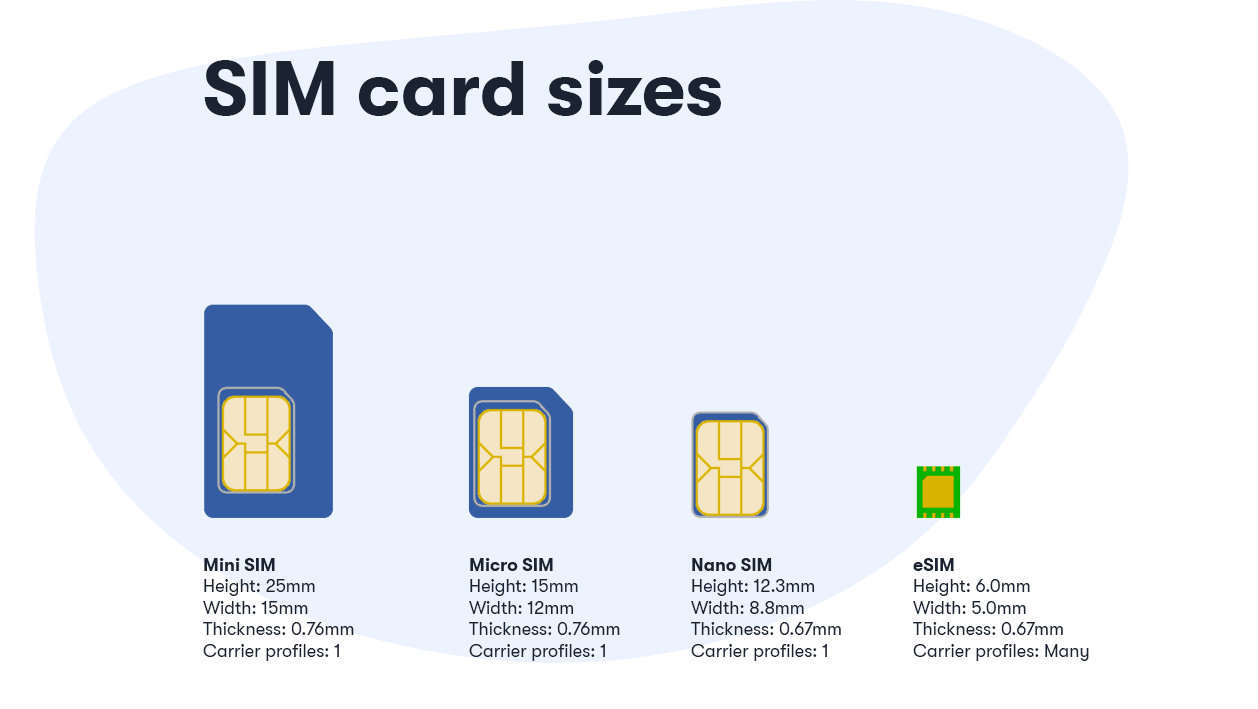
There are three physical SIM sizes you’ll run into, plus the embedded eSIM. Here’s how they stack up. The chip in the middle is identical across all of them, by the way. The only thing that changes is how much plastic surrounds it.
| SIM type | Dimensions | Roughly when it was common |
|---|---|---|
| Mini SIM (standard) | 25 × 15 × 0.76 mm | Older feature phones, early smartphones |
| Micro SIM | 15 × 12 × 0.76 mm | iPhone 4 era, early-2010s Android |
| Nano SIM | 12.3 × 8.8 × 0.67 mm | 2014 onward, today’s standard |
| eSIM (embedded) | About 6 × 5 mm, soldered in | 2018 onward, now common |
Notice the nano is barely bigger than the chip itself. That’s why you can’t really cut anything smaller than nano. There’s no spare plastic left to remove. For a deeper breakdown of each format and which phones use them, see our guide to SIM card sizes.
How to cut a SIM card to nano
Still need to do it? Okay. Maybe you’ve got a mini or micro SIM and a phone that wants nano, and ordering a fresh card isn’t an option right now. It’s doable, but I’ll be straight with you: there’s real risk here. The metal contacts on the chip have to stay fully intact. Nick them and the SIM is dead. So measure twice, cut once, and don’t rush.
Find a nano-SIM template
Print a to-scale nano-SIM cutting template (plenty are free online) and check it against an existing nano SIM or your phone’s tray. Make sure your printer didn’t shrink it. Scale matters down to the millimeter.
Line up the chip, not the edges
Place your larger SIM over the template so the gold contact chip sits exactly where the nano chip should be. The chip position is what your phone reads, so align to that, never to the outer plastic.
Mark your cut lines
Trace the nano outline onto the SIM with a fine marker. Double-check that no cut line crosses the metal contacts. If a line would clip the chip, your alignment is off. Stop and redo it.
Cut slowly with sharp scissors
Trim just outside your lines first, then shave down to the mark. Small cuts, not one big chomp. Keep the blade away from the gold. A craft knife and ruler work too if your hands are steady.
Sand the corners and test fit
The nano SIM has one clipped corner for orientation. Match it, then lightly file any rough edges with a nail file so the card seats flat. Slide it into the tray. It should drop in without forcing.
Power on and confirm signal
Put the tray back, boot the phone, and check for bars. If it reads the SIM, you’re done. If it doesn’t, the chip likely got nicked, and a replacement is the fix.

One honest caveat. If you cut too thick (some old SIMs are thicker than 0.67 mm), the card can jam in a nano tray. Sand the back down a touch if it won’t seat. And never force a tray closed on a SIM that doesn’t fit cleanly.
The US Mobile triple-cut SIM (no scissors needed)
Here’s the good news if you’re on US Mobile. Our physical SIM ships as a triple-cut card, sometimes called a universal SIM. The mini, micro, and nano sizes are pre-scored into one card, so you pop out the size you need by hand. No knife, no template, no holding your breath.
Flip the card over and you’ll find your SIM number, which you’ll need during the activation process. To get a mini SIM, gently press on the outer edges of the cut-out and the largest size pops free. Push a little further in for the micro size, and use the smallest cut-out for nano.

Folks use this flexibility in clever ways. Plenty of customers pop the card into an older spare phone to set up an inexpensive line for a kid, or drop it into an IoT device like a car tracker, a smartwatch, a GPS unit, or a home security system. One card, whatever size the gadget wants.
When cutting a SIM still makes sense
So when is the craft knife actually justified in 2026? A few real situations:
- An old or budget device that wants micro or mini. Some older phones, basic handsets, and certain IoT gadgets still use the larger sizes. If your only card is a nano, you can’t go bigger, but a triple-cut or adapter solves it.
- You have a larger SIM and a nano-only phone. The classic case. Trimming a mini or micro down to nano works if you’re careful, though a fresh card is safer.
- You’re traveling and bought a local SIM in the wrong size. It happens. A template and steady hands beat hunting for a phone shop abroad.
- Repurposing hardware. Hobbyist projects, dashcams, and trackers sometimes use odd SIM slots. Cutting (or an adapter) bridges the gap.
Outside of those, you’re better off just getting the right size card or going digital. Which brings us to the easiest option of all.
Or skip the scissors entirely with an eSIM
If your phone supports it, an eSIM sidesteps the whole sizing problem. There’s no physical card to cut, lose, or fit. The SIM is a chip already inside the phone, and you load your plan onto it by scanning a QR code or tapping a link. Setup takes about two minutes over Wi-Fi. Here’s how to activate an eSIM step by step.
iPhone
- iPhone XS, XR (2018) and newer
- iPhone 14 and later are eSIM-only in the US
Google Pixel
- Pixel 4a and newer
- Pixel 10 series is eSIM-only in the US
Samsung Galaxy
- Galaxy S21 and newer
- Z Fold and Z Flip lines, select A-series
Not sure?
- Check the full eSIM device list
- Phones bought in China or Hong Kong often skip eSIM
Want to see how it feels before committing? US Mobile runs a free 30-day eSIM trial with 30GB of premium data and unlimited talk and text, on your choice of the Warp 5G or Dark Star network. You add a payment method to start and bring over an existing number, but you aren’t charged during the trial, and there’s no contract if you walk away. Paid plans start at $8/mo for light users and $25/mo for Unlimited Starter, all with eSIM and no activation fee.
Try US Mobile eSIM free for 30 days
30GB of data on Warp 5G or Dark Star. No card to cut, no charge during the trial, no contract.
Start your free trialFrequently Asked Questions
Can you cut a SIM card to nano size?
Yes, you can cut a mini or micro SIM down to nano using a printed nano-SIM template and sharp scissors or a SIM punch tool. The key is keeping the gold contact chip fully intact, since nicking it kills the card. Cut slowly and align to the chip, not the outer plastic. If you can wait, a fresh nano SIM from your carrier is the safer route.
Do I still need to cut SIM cards in 2026?
Usually not. Since around 2014, nearly every new phone uses the nano SIM, the smallest standard size, so moving a number between modern phones means the card already fits. Many recent phones skip the SIM tray entirely and use an eSIM instead. Cutting is mostly needed only for older devices or odd hardware.
What are the SIM card sizes?
There are three physical sizes: mini (25 x 15 mm), micro (15 x 12 mm), and nano (12.3 x 8.8 mm), plus the embedded eSIM (about 6 x 5 mm, soldered into the phone). The chip is identical across all of them; only the surrounding plastic differs. Nano is today’s standard.
How do I size a US Mobile SIM card?
US Mobile ships a triple-cut SIM with mini, micro, and nano pre-scored into one card. You pop out the size you need by hand, no scissors required. Keep the white frames so you can reassemble a larger size later if you switch devices.
Is an eSIM better than cutting a physical SIM?
For most people, yes. An eSIM removes the sizing problem entirely since there’s no card to cut, lose, or fit. You load your plan by scanning a QR code, and setup takes about two minutes. US Mobile offers a free 30-day eSIM trial with 30GB of data so you can test it without cutting anything.
what a bullshit article, not about cutting sims at all