


If you have used a cellphone at any point in the last three decades, you have dealt with a SIM card. That small chip tells your phone which carrier to connect to, what number to use, and which plan to run. For most of that history, SIM cards were physical objects you had to pop in and out of a tiny tray. But the SIM card has been evolving since the very first one was made in 1991, and now it is undergoing its biggest transformation yet.
What is an eSIM? Everything You Need to Know
That is changing. eSIM (short for Embedded Subscriber Identity Module) is a reprogrammable chip soldered directly onto your phone’s motherboard. Instead of swapping plastic cards, you download a carrier profile over the air and your phone connects to the network in minutes. Apple went all-in starting with the iPhone 14 lineup in 2022, removing the physical SIM tray entirely for US models. Google, Samsung, and Motorola have followed with eSIM support across their 2025 and 2026 flagship devices.
A Brief History of eSIM
The story of eSIM is really the story of technology catching up to ambition. In 1991, a Munich smart-card maker named Giesecke+Devrient created the first SIM card for Finnish wireless carrier Radiolinja. SIM stood for Subscriber Identity Module. That original card was the size of a credit card. Nobody imagined it would still be around three decades later, or that it would one day vanish entirely.
By 2010, the GSMA (Global System for Mobile Communications Association) began formally discussing the concept of an embedded, software-based SIM. The idea was radical: instead of a physical card, what if the SIM data lived in a chip soldered to the phone? What if you could reprogram it wirelessly? The challenge was not technical. It was organizational. Nobody agreed on the standard.
In 2012, the GSMA published its initial eSIM specifications, but they were aimed squarely at IoT and machine-to-machine use cases. Industrial devices like connected vehicles and trackers. That is where the momentum lived. Apple, however, had a different vision. At a 2012 ETSI meeting, Apple quietly pushed for consumer applications. Motorola saw it as industrial-only. The debate would simmer for years.
Progress accelerated in 2016. The GSMA published its first consumer Remote SIM Provisioning specification, now called SGP.22 (link to spec). That same year, Samsung Gear S2 Classic became the first consumer eSIM device in March. Three years later, the Apple Watch Series 3 launched with eSIM in September 2017, and Google shipped the Pixel 2 as the first eSIM smartphone that October. The technology was no longer theoretical. People could actually buy and use it.
But smartphones moved slowly. The Pixel 2 had eSIM support, but plenty of alternatives remained. The Motorola razr became the first eSIM-only smartphone in 2019, with no physical SIM slot at all. Still, the industry hedged its bets.
Everything changed in 2022. Apple removed the SIM tray from the iPhone 14 entirely. Not added eSIM as an option. Removed the tray. It was the tipping point. Manufacturers followed. By 2025, eSIM-enabled device shipments are projected to exceed 633 million units, with 47 percent of all smartphones shipping with eSIM support. The iPhone 17 is expected to be eSIM-only in multiple countries. The physical SIM tray has transformed from essential to extinct in less than a decade.
And the story is not over. Researchers are already working on iSIM, short for Integrated SIM. Instead of a separate eSIM chip, the SIM functionality would be built directly into the phone’s main processor. No dedicated chip needed. Just software living in the silicon. If that happens, the line between hardware and connectivity disappears entirely. Your phone becomes the SIM.
How Does eSIM Actually Work?
To understand eSIM, you need to understand IMSI, which stands for International Mobile Subscriber Identity. Every SIM, physical or embedded, stores one IMSI. This is the credential your phone uses to authenticate with a carrier’s network. It contains your account information, your phone number, and the rules that tell the network how to bill you.
A traditional SIM stores one IMSI on a removable card. Change carriers, and you physically swap the card. An eSIM stores profiles digitally in a chip soldered to your phone, and it can hold multiple profiles simultaneously. You can have Carrier A and Carrier B profiles on the same phone at the same time.
When you activate an eSIM, your carrier sends a QR code or push notification through their app. You scan the code, the profile downloads over Wi-Fi to your phone, and your device registers with the network. The entire process takes about two minutes. No waiting for a SIM kit in the mail, no driving to a store, no ejector tool fumbling.
The magic is standardized. Your phone uses the GSMA’s Remote SIM Provisioning specification, which means eSIM activation works the same whether you are buying from Apple or Android, regardless of which carrier you choose.
To see the difference in action, compare these two activation flows side by side.
Activating a physical SIM plan involves four steps:

- Research and purchase a plan online or at a retail store
- Carrier gives you a SIM card with their network-specific information stored on it
- Insert the card in your phone
- Your phone uses the data stored on the card to connect to the network
Activating an eSIM plan is simpler and faster. It also involves four steps, but watch how much time you save:

- Research and purchase a plan online
- Carrier shares a voucher with a QR code
- Instant activation by scanning the QR code
- The provisioning system sends a SIM profile to the eSIM chip embedded inside your phone and service begins working
Simply put, activating with eSIM can save you an hours-long trip to the mall or waiting multiple days for delivery.
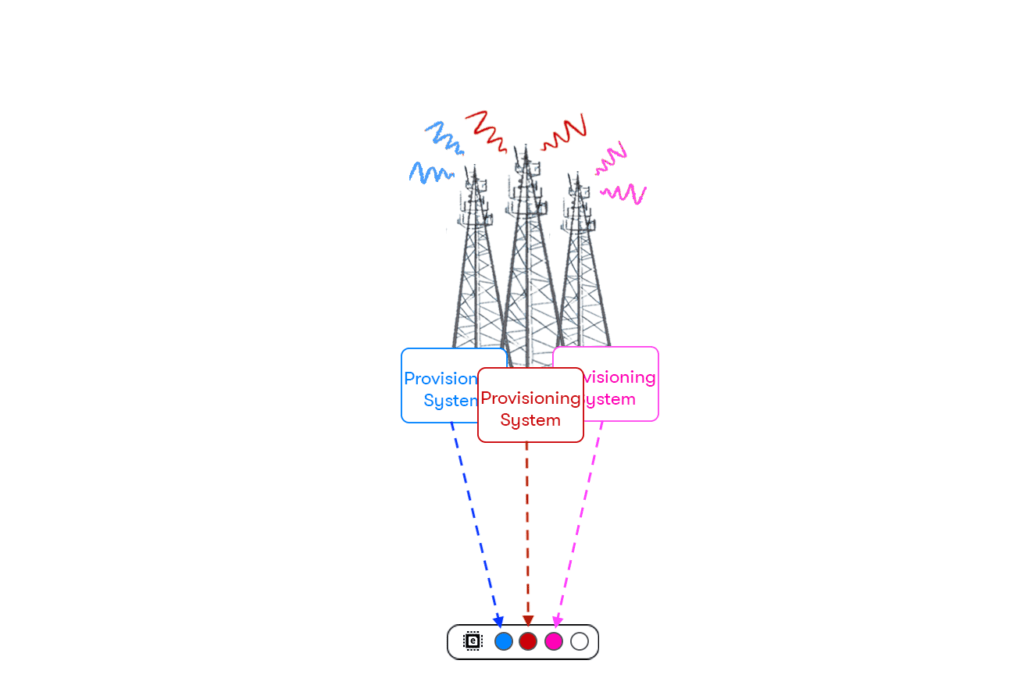
An eSIM can store multiple carrier profiles simultaneously. You can keep your personal number active while adding a work line, or layer in a travel plan on the same phone, all without carrying a second device or swapping SIM trays.
Why eSIM Matters
Switch Carriers Without Swapping Cards
Because eSIM profiles are software-based, switching carriers is as simple as downloading a new profile. You can store multiple profiles and toggle between them in your phone’s settings. This is particularly useful if you travel frequently or want a backup line on a second network.
Better Security
Physical SIM cards can be removed by anyone who gets their hands on your phone. That makes SIM-swap fraud relatively straightforward for bad actors. With eSIM, the chip is soldered to the board. Nobody can pull it out, and changing the profile requires your device passcode.
More Room Inside Your Phone
Removing the SIM tray frees up internal space that manufacturers can use for a larger battery, better haptics, or improved water resistance. It is one of the reasons Apple and others are moving toward eSIM-only designs.
Instant Activation
With US Mobile, activating an eSIM plan takes about two minutes from start to finish. Compare that to waiting days for a SIM kit to arrive or spending an hour at a carrier store. If you want to see how that compares to the old way, check out our eSIM vs. physical SIM breakdown.
Powerful use cases
Consumers:
- Easily activate a free trial to test out a new carrier in an instant. No need to visit a retail store or wait several hours for a data transfer.
- Switch between your business and personal phone number with a tap (or use both simultaneously).
- Activate wireless service on all your products – be it a Tesla or a drone – without having to mess with multiple plastic SIM cards.
- Travelers can remain connected around the world by activating a fairly priced eSIM plan from a local carrier in the country they’re visiting.
Businesses:
- Account managers or IT personnel can remotely activate or adjust cellular plans on thousands of devices at once.
- Increase the longevity of connected machines and reduce maintenance costs by using eSIM to remotely update wireless plans at the end of a Telco contract.
- Decrease costs and boost the efficiency of logistics operations by remotely managing tracker devices on global shipments and forgoing swapping out SIM cards.
- Distribute devices with eSIM to automatically connect to the proper Telco upon the first bootup based on factors programmed during manufacturing.
eSIM vs. Physical SIM: A Side-by-Side Comparison
Whether you are debating activation methods or simply curious about how the two technologies compare, here is a breakdown of the key differences between using a physical SIM card and an eSIM.
| Feature | Physical SIM | eSIM |
| Locked to a carrier? | One carrier per SIM. | Reprogrammable to multiple carriers. |
| Dual-SIM (use two lines simultaneously) | Some phones have two SIM card slots. | Use an eSIM and a physical SIM, or 2 eSIMs simultaneously. |
| Switch phone lines on the fly | Pop out the SIM tray, remove the card, and pop a new one in. | Go to phone settings and turn your lines on/off. |
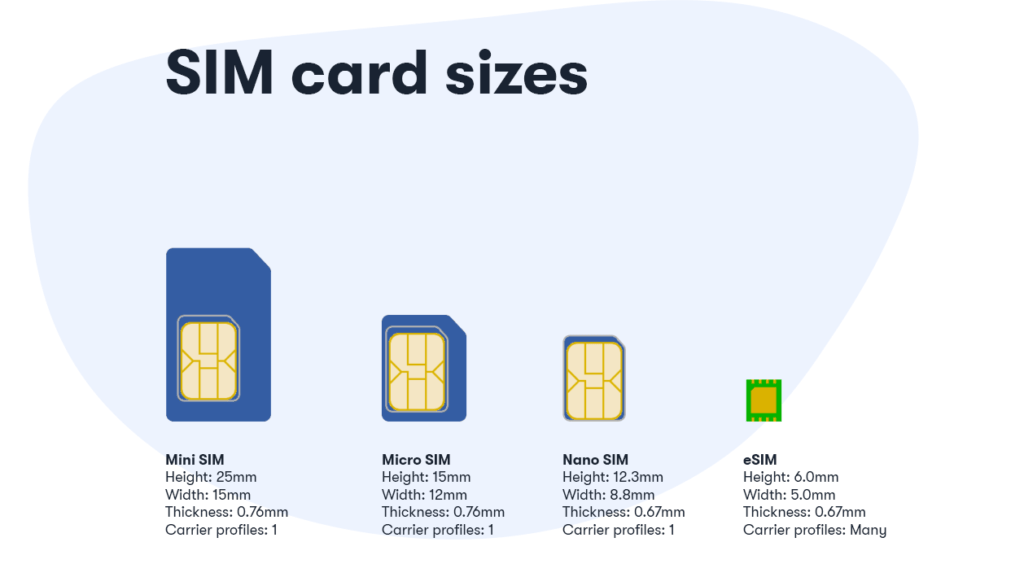
| Size dimensions | 12.3mm x 8.8mm | 6mm x 5mm |
Time-saving and ease of use are some of the most impactful considerations to make before choosing an activation method. Here’s what you should expect:
How to Activate eSIM on iPhone

Starting with the iPhone 14, Apple removed the physical SIM tray from all US models. The iPhone 15, iPhone 16, and iPhone 16 Pro Max all use eSIM exclusively. US Mobile has built a seamless framework for this transition. Activating eSIM on your iPhone through US Mobile takes just two minutes.
Activating eSIM on US Mobile is quick, friendly, and it has never been easier to get cellular service.
See below to learn how you can activate your eSIM on Samsung and Google Pixel devices.
How to Activate eSIM on Samsung
Samsung’s Galaxy S25 Ultra, S24, and the Galaxy Z Fold and Z Flip series all include eSIM support. If you need detailed instructions specific to your Samsung device, visit their official eSIM support page.
How to activate eSIM on Pixel
Google’s Pixel 9 Pro and Pixel 9 Pro Fold both feature eSIM. Interestingly, Google was actually among the first to ship an eSIM smartphone when the Pixel 2 launched in October 2017. For comprehensive device-specific guidance, check out the official Google Pixel eSIM support documentation.
Using eSIM for International Roaming
One of the best things about eSIM is how it simplifies staying connected when you travel. With US Mobile, you do not even need to think about buying a separate international plan. Our Unlimited Premium and Unlimited Starter plans come with free international roaming built right in.
Premium plan members get up to 10 GB of international data in 102 countries, plus 5 GB in an additional 78 countries, along with 200 minutes of calling and 250 texts. Starter plan members on annual billing get 1 GB of international data with the same calling and texting allowance. No surprise roaming charges. No airport SIM kiosk panic. Just land at your destination and your phone connects automatically.

Manage your lines and track your balance from the all-new US Mobile app. See your international data usage in real-time, switch between countries in seconds, and stay in control of your connectivity no matter where you are in the world.
See all 180+ countries covered. For independent validation, read PCMag’s review of our international roaming solution.
The next iteration of SIM has arrived. Now that Apple removed the SIM tray entirely, other phone manufacturers are following suit. The Motorola razr+ 2025, the entire iPhone 16 lineup, and the Pixel 9 series all support eSIM exclusively. That means you cannot use a physical card if you wanted to. Expect widespread adoption of eSIM across phones, tablets, smartwatches, and IoT devices in the coming years.
The wireless industry is trending toward iSIM, where SIM functionality integrates directly into the phone’s main processor. When that becomes standard, the line between hardware and connectivity will blur completely. Your phone will not just contain the SIM. It will be the SIM.
If you would like to give eSIM a try, we are offering you a free trial for unlimited domestic talk, text, and data. No commitments, no questions asked.
Will you be sporting eSIM on your next device? Or are you holding out on a physical SIM card for as long as possible?
Frequently Asked Questions
What happens if you delete an eSIM?
Deleting an eSIM profile removes it from your device, but it does not cancel your plan. You can re-download the profile by contacting your carrier or scanning a new QR code. Think of it like removing an app. The account still exists; you just need to reinstall.
How long does eSIM take to activate?
With US Mobile, the entire process takes about two minutes. You scan a QR code, confirm the download, and your phone connects to the network. Some carriers may take longer if they require additional verification steps.
Can you use an eSIM on a locked phone?
It depends. If your phone is locked to a specific carrier, you will only be able to use eSIM profiles from that carrier. To use eSIM with US Mobile or any other provider, your device needs to be unlocked. You can usually request an unlock from your current carrier after meeting their requirements.
How do I know if my phone is eSIM compatible?
The quickest way is to check your phone’s settings. On iPhone, go to Settings > Cellular > Add eSIM. On Android, look under Settings > Network & Internet > SIMs. If you see an option to add a digital SIM, your device supports it. You can also check our full device compatibility list.
How much does an eSIM cost?
The eSIM itself is free. There is no physical product to ship. You only pay for the wireless plan you choose. With US Mobile, plans start at $8/month for a light-use line, with unlimited options available across multiple networks.
Can you transfer an eSIM to another phone?
Yes. US Mobile’s software-defined transfer process lets you move your eSIM between devices regardless of manufacturer. That means you can go from a Pixel to an iPhone or vice versa without calling support. Read more in our eSIM transfer guide.
How do I switch from a physical SIM to eSIM?
If you are already a US Mobile customer with a physical SIM, you can switch to eSIM through your account dashboard or the US Mobile app. The process transfers your existing number and plan to a digital profile. You will not lose your number or your existing data, and the switch typically completes in under five minutes.
How do eSIM cards work?
An eSIM stores carrier profiles digitally on a chip soldered to your phone’s motherboard. Activation happens when you scan a QR code provided by your carrier. The profile downloads to your device over Wi-Fi and registers with the carrier’s network. Because an eSIM can hold multiple profiles simultaneously, you can have different carriers available on one phone without carrying multiple devices. Refer back to the ‘How Does eSIM Actually Work’ section above for a deeper technical explanation.
How do I remove an eSIM?
Removing an eSIM from your device is straightforward. On iPhone, go to Settings, Cellular, select the eSIM you want to remove, and tap Delete Plan (or Remove). On Android, navigate to Settings, Network & Internet, SIMs, select the eSIM profile, and tap Remove or Delete. Removing the profile removes it from your device but does not cancel your plan with the carrier. Your account remains active, and you can re-download the profile anytime.
Ready to make the switch? Whether you are setting up a brand new phone or moving from a physical SIM, activating eSIM with US Mobile takes just a couple of minutes. Activate your eSIM now at usmobile.com/esim.


Honestly, articles like this are useful because a lot of travelers still don’t know how much easier eSIMs make international trips until they actually use one. Being able to activate data before landing and instantly connect without searching for local SIM cards saves a lot of time and stress.
Does US Mobile support eSIM Quick Transfer for transferring an eSIM from a previous iPhone to a new iPhone?
Absolutely! Read or watch a video tutorial here.
eSim is taking a step backwards in time to the late 80’s early 90’s with CDMA/TDMA, where you would have to call your carrier and give them your IMEI number for them to put your phone on the network. And yes I remember the days of being asked for either the hex or decimal version of the IMEI number. This is just so stupid SIM cards were designed to be able to swap between phones quick and easily without having to contact a carrier every time you needed to do it. You take your sim card out of one phone place it in the other one everything transfers over to the new phone and you go on your Merry way now here again we’re stepping back in time so if I have two phones one for vacation and one for normal use I would have to contact the carrier every time I switch back and forth between phones this is just asinine.
eSIM is good to me. Multiple profiles is better. Business persons who travel across countries, benefit a lot.
The feature about the multiple profiles is great. Usually I use a Dual Sim phone for this. Regarding this aspect, eSIM is perfect for me.
Canadian visiting the US for a conference in December, an eSIM prepaid for data would be ideal. Will this be available?
How would I order this? It looks like right now the site assumes I need to order the welcome package.
Thanks.
Funny world. Reading it after IPhone for first time announced dual sim mobiles.
In India we have 4 sim mobile, manufactured by Chinese companies.
Biggest issue with using eSIM in phones is that every time you change handsets you have to deal with letting your carrier know. With a regular sim card, you just insert into the new phone, NO discussion or interaction with the carrier.
Sure, this could be an automated portal, but I can see all the major carriers deciding to charge a fee every time you do an eSIM transaction.
I really don’t see how using eSIM would make using a local carrier easier while traveling. Sounds like you’d have to deal with having your primary carrier reprogram the eSIM once you get back…
Will you be supporting the eSIM on Apple Watch?