


An eSIM is a reprogrammable SIM built into your phone, so you download a carrier profile over the air instead of swapping a plastic card. Here’s how eSIM works, why nearly every new eSIM phone ships without a SIM tray now, and how to try one free on US Mobile.
What is an eSIM?
If you’ve used a cell phone at any point in the last three decades, you’ve dealt with a SIM card. That little chip tells your phone which carrier to connect to, what number to use, and which plan to run. For most of that history it was a physical object you popped in and out of a tiny tray with a paperclip.
An eSIM changes the form, not the job. eSIM is short for embedded Subscriber Identity Module, and it’s a reprogrammable chip soldered straight onto your phone’s motherboard. Instead of swapping plastic, you download a carrier profile over the air and your phone connects to the network in minutes. Same credentials, same authentication, no card to lose.
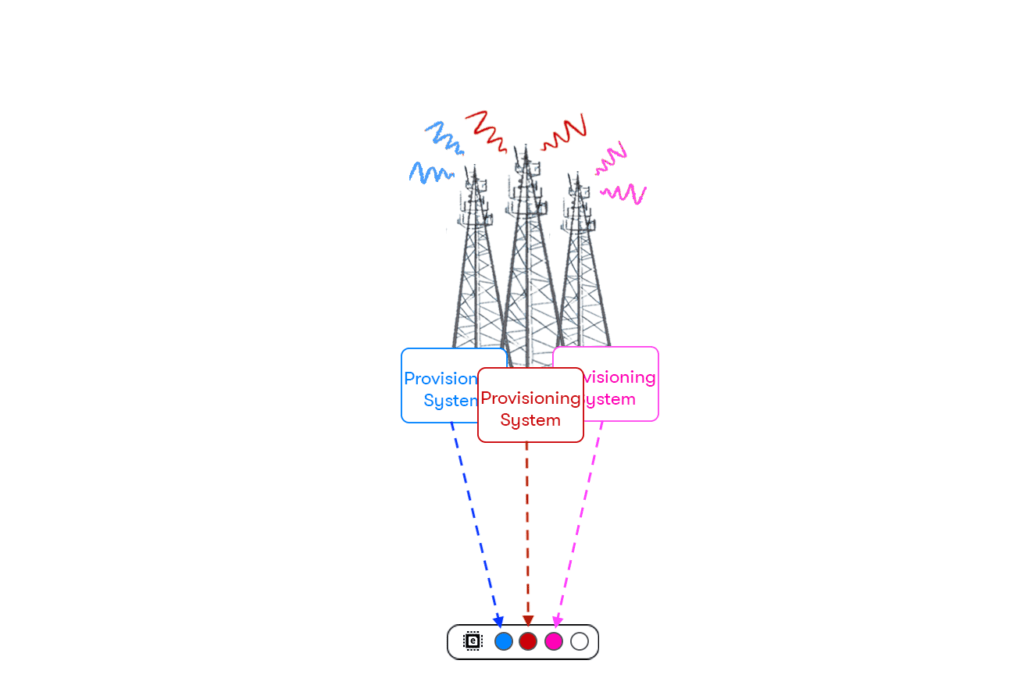
Here’s the part that surprises people. Your eSIM phone can hold several carrier profiles at once. Personal line, work line, a travel plan from a local carrier abroad, all living on the same chip, with one (or two, in Dual SIM mode) active at a time. New to all of this? Our deeper explainer on what an eSIM card actually is walks through it from scratch.
How an eSIM actually works
To get why eSIM matters, it helps to know what a SIM does in the first place. Every SIM, physical or embedded, stores an IMSI (International Mobile Subscriber Identity). That’s the credential your phone uses to authenticate with a carrier’s network, and it carries your account info, your number, and the rules that tell the network how to bill you.

A traditional SIM stores one IMSI on a removable card. Change carriers and you physically swap the card. An eSIM stores those profiles digitally and can hold several at once, so switching networks is a download, not a trip to the store.

Activation is genuinely quick. Your carrier hands you a QR code (or a tap-to-activate link in their app), you scan it in your phone’s settings, the profile downloads over Wi-Fi, and your device registers with the network. The whole thing runs on the GSMA’s Remote SIM Provisioning standard, which is why eSIM setup looks basically the same whether you’re on an iPhone or an Android, and no matter which carrier you pick.
A short history of the SIM (1991 to now)
The story of eSIM is really the story of the tech catching up to the ambition. In 1991, a Munich smart-card maker named Giesecke+Devrient built the first SIM card for the Finnish carrier Radiolinja. That original card was the size of a credit card. Nobody figured it’d still be around three decades later, let alone that it would eventually vanish into the motherboard.
Around 2010 the GSMA started seriously kicking around the idea of an embedded, software-based SIM. The hard part wasn’t the engineering. It was getting an entire industry to agree on a standard. The first specs landed in 2012, but they were aimed at IoT and machine-to-machine gear, things like connected cars and asset trackers. Apple pushed for consumer use early; others saw it as industrial-only. The debate simmered for years.
Things sped up in 2016, when the GSMA published its first consumer Remote SIM Provisioning spec (SGP.22). The hardware showed up fast after that. The Samsung Gear S2 Classic became the first consumer eSIM device, the Apple Watch Series 3 shipped with eSIM in September 2017, and the Google Pixel 2 became the first eSIM smartphone that October. The Motorola razr went eSIM-only in 2019, the first phone with no SIM slot at all.
Then 2022 happened. Apple pulled the SIM tray out of the US iPhone 14 lineup entirely. Not “added eSIM as an option.” Removed the tray. That was the tipping point, and the rest of the industry followed. By 2025, eSIM-enabled device shipments are projected to top 633 million units, with roughly 47% of smartphones shipping eSIM-capable, per Counterpoint Research.
And it isn’t finished. Next up is iSIM (Integrated SIM), where the SIM lives directly inside the phone’s main processor instead of on a separate chip. No dedicated chip at all, just software in the silicon. If that becomes standard, the line between hardware and connectivity basically disappears. Your phone won’t contain the SIM. It’ll be the SIM.
eSIM pros and cons
eSIM isn’t magic, and it’s fair to ask what the catch is before you commit. Here’s the honest version of both sides.
What’s great about eSIM
- Switch carriers in taps. A new profile is a download, not a shipped card.
- Multiple profiles at once. Keep your personal number while adding a work line or a travel plan, all on one phone.
- Genuinely fast setup. About two minutes, online, over Wi-Fi. No mail, no store.
- Harder to steal. Nobody can pop the chip out, and changing a profile needs your device passcode, which cuts SIM-swap risk.
- More room inside the phone. No tray means space for a bigger battery and better water resistance.
The downsides to know
- Moving phones takes a step. You can’t just pop a card into a new device. You transfer the profile (often easy, occasionally a re-download from the carrier).
- Older and budget phones may not support it. Most pre-2018 iPhones and various entry-level Androids have no eSIM.
- Carrier locks still apply. A phone locked to one carrier won’t load another carrier’s eSIM until it’s unlocked.
- Some regional models skip it. Phones bought in China or Hong Kong, for example, often ship without eSIM.
- Dead phone, no quick swap. You can’t yank the SIM and slot it into a spare handset the way you could with plastic.
Net take? For most people on a modern phone, the upsides win easily. The friction shows up mainly when you’re hopping between very old devices or moving across regions with different model variants.
eSIM vs physical SIM, side by side
Curious how the two stack up in practice? Here’s the short version. For the full breakdown, see our eSIM vs physical SIM comparison.
| Feature | Physical SIM | eSIM |
|---|---|---|
| Locked to a carrier? | One carrier per card | Reprogrammable to multiple carriers |
| Run two lines at once | Only on dual-tray phones | eSIM + physical SIM, or two eSIMs |
| Switch lines | Pop the tray, swap the card | Toggle on/off in phone settings |
| Setup speed | Minutes to days (delivery) | Instant, about 2 minutes |
| Security | Can be physically removed | Soldered in; profile changes need your passcode |
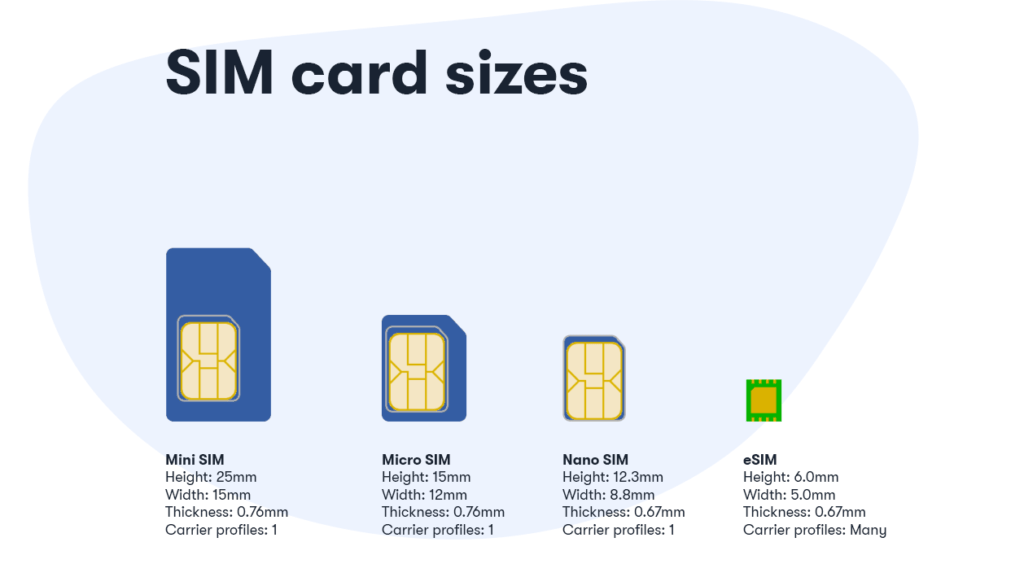
| Size | 12.3mm x 8.8mm | 6mm x 5mm |
Performance is a wash, by the way. On the same network you get identical signal, speed, and battery life. Running two active lines in Dual SIM uses a bit more battery, but an eSIM on its own doesn’t.
Which phones have an eSIM?
Most flagship and mid-range phones from 2020 on support eSIM, and a growing number are eSIM-only. Here’s the quick read. If you’re unsure, scan the full eSIM device list.
iPhone
- iPhone XS, XS Max, XR (2018) and newer
- iPhone 14 through 17 are eSIM-only in the US
Google Pixel
- Pixel 4a and newer (Pixel 2 was the very first)
- Pixel 10 series is eSIM-only in the US
Samsung Galaxy
- Galaxy S20 series and newer, incl. S25
- Z Fold and Z Flip lines, plus select A-series
Beyond phones
- Apple Watch (Series 3 was the first with eSIM), many Motorola and OnePlus models
- Tablets and laptops from Dell, HP, Lenovo, Microsoft Surface
How to activate an eSIM
The flow is short on every modern phone. Get on Wi-Fi, open your SIM settings, scan the carrier’s QR code, and turn the line on. That’s the whole thing. Our step-by-step guide to activating an eSIM covers iPhone and Android in detail, but here’s how it goes on US Mobile, including the free trial.
Start at get-started
Go to usmobile.com/get-started and create an account or log in.
Add a new line, then Special Offers
Choose Free Trial and continue. Want the details on terms and eligibility? Here’s the full rundown of the free eSIM trial.
Pick eSIM activation
Skip the physical Starter Kit and select eSIM, so there’s nothing to wait on in the mail.
Add a payment method
A card is required to start the trial, but you’re not charged during the 30 days, and there’s no contract if you walk away.
Choose your network
Select Warp 5G or Dark Star. Paid plans give you access to all three of US Mobile’s nationwide networks; the trial runs on these two.
Transfer your number and activate
The trial asks you to bring your existing number over. Confirm, scan the QR code with your camera, and your line is live in a few minutes.
Paid plans start at $8/mo for light users and $25/mo for Unlimited Starter, every one of them with eSIM, no activation fee, and no contract. Annual billing brings those down further.
Prefer to watch it happen? Here are quick walkthroughs for the three most common phones.
Activating eSIM on iPhone

Activating eSIM on Samsung Galaxy
Activating eSIM on Google Pixel
Using an eSIM to travel
One of the best things about eSIM is how much it simplifies staying connected abroad. With US Mobile, you don’t have to think about a separate international plan on the right tiers, because roaming is built in.
Unlimited Premium members get 20GB of international roaming data, 200 minutes of calling, and 250 texts across 180+ destinations. Unlimited Starter on annual billing includes 1GB of roaming data with the same calling and texting allowance. No surprise roaming charges and no airport-kiosk panic. You land, and your phone connects.
Headed somewhere your plan doesn’t bundle? You can add a standalone data eSIM in 140+ countries, and travelers often grab one of those locally. If you’re comparing options, our roundup of the best international eSIM picks is a good starting point. For independent validation, PCMag reviewed US Mobile’s roaming setup, and you can see all 180+ destinations covered.
Manage it all from the US Mobile app: track your international data in real time, switch countries in seconds, and stay in control wherever you are.

Try US Mobile eSIM free for 30 days
30GB of data on Warp 5G or Dark Star. A card is required to start, but you’re not charged during the trial, and there’s no contract.
Start your free trialFrequently Asked Questions
What is an eSIM, in simple terms?
An eSIM is a SIM card built into your phone instead of a removable plastic chip. It’s reprogrammable, so you download a carrier profile over the air and connect to a network in a couple of minutes. It does the same job as a regular SIM, it just lives inside the device.
What’s the downside of an eSIM?
The main trade-offs: moving to a new phone takes an extra step (you transfer or re-download the profile rather than popping a card in), older or budget phones may not support eSIM at all, and a carrier-locked phone won’t load another carrier’s eSIM until it’s unlocked. Some regional phone models, like units sold in China or Hong Kong, also skip eSIM. For most people on a modern, unlocked phone, none of this is a dealbreaker.
Does an eSIM have a phone number?
Yes. An eSIM works exactly like a physical SIM when it comes to your number. The profile you download carries your phone number, and you can either bring an existing number over by porting it or get a new one. If you store multiple eSIM profiles, each one can have its own number.
How long does an eSIM take to activate?
About two minutes to download and set up the profile. If you’re porting a number from another carrier, the full transfer usually finishes within roughly 15 minutes.
Can I use an eSIM on a locked phone?
Only with the carrier it’s locked to. To use an eSIM from US Mobile or any other provider, your phone needs to be carrier-unlocked. You can usually request an unlock from your current carrier once you’ve met their requirements.
How do I know if my phone supports eSIM?
Check your settings. On iPhone, go to Settings > Cellular > Add eSIM. On Android, look under Settings > Network & Internet > SIMs. If you see an option to add a digital or downloaded SIM, your phone supports it. You can also check US Mobile’s full device compatibility list.
Can I transfer an eSIM to another phone?
Yes. US Mobile’s software-defined transfer lets you move your eSIM between devices regardless of brand, so you can go from a Pixel to an iPhone without calling support. On iPhone, Apple’s Quick Transfer can also move an eSIM over Bluetooth with no QR code.
What happens if I delete an eSIM?
Deleting an eSIM profile removes it from your device but does not cancel your plan. Think of it like deleting an app. The account still exists, and you can re-download the profile from your carrier with a new QR code anytime.
How much does an eSIM cost?
The eSIM itself is free, since there’s nothing to ship. You only pay for the wireless plan you choose. With US Mobile, plans start at $8/month for light use, with unlimited options across three nationwide networks, and you can test it first on a free 30-day trial with 30GB of data.

Honestly, articles like this are useful because a lot of travelers still don’t know how much easier eSIMs make international trips until they actually use one. Being able to activate data before landing and instantly connect without searching for local SIM cards saves a lot of time and stress.
Does US Mobile support eSIM Quick Transfer for transferring an eSIM from a previous iPhone to a new iPhone?
Absolutely! Read or watch a video tutorial here.
eSim is taking a step backwards in time to the late 80’s early 90’s with CDMA/TDMA, where you would have to call your carrier and give them your IMEI number for them to put your phone on the network. And yes I remember the days of being asked for either the hex or decimal version of the IMEI number. This is just so stupid SIM cards were designed to be able to swap between phones quick and easily without having to contact a carrier every time you needed to do it. You take your sim card out of one phone place it in the other one everything transfers over to the new phone and you go on your Merry way now here again we’re stepping back in time so if I have two phones one for vacation and one for normal use I would have to contact the carrier every time I switch back and forth between phones this is just asinine.
eSIM is good to me. Multiple profiles is better. Business persons who travel across countries, benefit a lot.
The feature about the multiple profiles is great. Usually I use a Dual Sim phone for this. Regarding this aspect, eSIM is perfect for me.
Canadian visiting the US for a conference in December, an eSIM prepaid for data would be ideal. Will this be available?
How would I order this? It looks like right now the site assumes I need to order the welcome package.
Thanks.
Funny world. Reading it after IPhone for first time announced dual sim mobiles.
In India we have 4 sim mobile, manufactured by Chinese companies.
Biggest issue with using eSIM in phones is that every time you change handsets you have to deal with letting your carrier know. With a regular sim card, you just insert into the new phone, NO discussion or interaction with the carrier.
Sure, this could be an automated portal, but I can see all the major carriers deciding to charge a fee every time you do an eSIM transaction.
I really don’t see how using eSIM would make using a local carrier easier while traveling. Sounds like you’d have to deal with having your primary carrier reprogram the eSIM once you get back…
Will you be supporting the eSIM on Apple Watch?